


Need to load up your GMC truck at night? Whether you're working late, tailgating, or just need extra visibility, your truck bed lights make all the difference. But how do you turn them on and off? Don’t worry—we’ve got you covered with this simple guide.
At Huston GMC, we’re all about helping you make the most of your truck’s features. Whether you need a new GMC, expert service, or just a quick tip, our team is here to help. Read on to master your truck bed lights, and feel free to visit or contact us anytime!
Locating Your GMC Truck's Bed Lights Control
Finding the switch for your truck bed lights is simple, but the exact location can vary by model. GMC places controls in convenient spots so you can quickly turn the lights on when needed. Here’s where to look:
Common Control Locations
- Inside the Cabin – Some models have a button near the headlight controls on the dashboard. This lets you turn the lights on before stepping out of the truck.
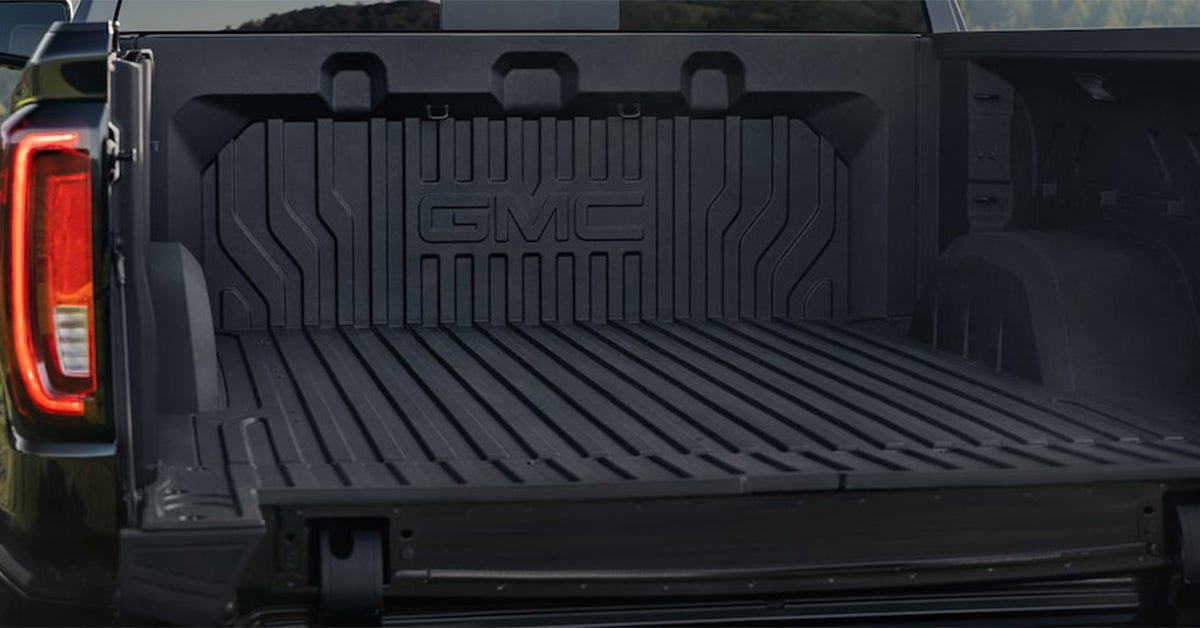
- On the Bed Itself – Many trucks have a switch on the inside wall of the bed, close to the tailgate. This placement is useful when loading or unloading cargo at night.
- Infotainment System – Certain models let you control lighting through the touchscreen display. You may also be able to adjust brightness or set auto-on features.
Other Ways to Activate Bed Lights
- Automatic Activation – Some GMC trucks turn on the bed lights when you unlock the doors or lower the tailgate. If you don’t see a switch, check whether your truck has this feature.
- Key Fob Controls – In select models, you may be able to activate the truck bed lights using your key fob.
- Owner’s Manual Reference – If you're unsure where to find the controls, check the manual for your specific model.
Want to make sure your setup is working right? Stop by Huston GMC, and we’ll walk you through it!
How to Turn Your GMC Truck Bed Lights On & Off
Turning your truck bed lights on and off is quick and simple. Whether you're loading gear at night or just need extra visibility, knowing how to control the lights makes a big difference. Follow these steps to ensure you can turn them on or off with ease.
Turning the Lights On
- Find the control button – Look inside the cabin near the headlight switch or on the side of the truck bed.
- Press or toggle the switch – If the button is inside the truck, press it once. If it’s on the bed, flip the switch.
- Check for automatic activation – Some models turn the lights on when you unlock the truck or lower the tailgate.
- Use your infotainment system – If your truck has a touchscreen, you may be able to activate the lights through the settings menu.
Turning the Lights Off
- Use the same switch – Press or flip the control again to turn the lights off.
- Let the auto-timer work – Some trucks shut the lights off automatically after a set time to save power.
- Check for dim settings – If the lights seem dim but not fully off, adjust the brightness through the dashboard or infotainment screen.
- Ensure the tailgate is closed – In some models, the bed lights stay on when the tailgate is open.
Understanding how your truck's lighting system works helps you get the most out of your vehicle. Not sure if your system is working right? Visit Huston GMC, and we’ll be happy to help!
Comparing GMC Truck Bed Lighting to Other Brands
Not all truck bed lights are the same. Some brands offer basic lighting, while others provide advanced controls and brighter LEDs. GMC’s system stands out by delivering superior brightness, smart features, and user-friendly controls. Here’s how it compares to the competition.
Brightness & Coverage
- GMC’s lighting is bright and evenly spread, covering the full bed for maximum visibility.
- Some brands use smaller lights that leave dark spots, making it harder to see at night.
- LEDs in GMC models last longer, use less power, and provide consistent brightness over time.
Ease of Use
- GMC: Controls are easy to reach inside the cabin or on the bed for quick access.
- Other brands: Some manufacturers place switches in hard-to-reach spots, making it inconvenient to turn the lights on or off.
- Many GMC trucks also turn the lights on automatically when the tailgate drops, offering hands-free convenience.
Smart Features
- Some GMC models let you adjust brightness levels through the infotainment system, giving you greater control.
- Auto shut-off prevents unnecessary battery drain, ensuring lights don’t stay on longer than needed.
- Not all brands include these advanced features, making GMC a leader in truck bed lighting technology.
Want to see the difference in person? Visit Huston GMC to explore the latest models and experience the benefits of GMC’s advanced truck bed lighting!
Customizing Your GMC Truck Bed Lighting
Your truck should work the way you need it to. With the right setup, you can make the bed lighting fit your style and needs. Whether you want better visibility, easier access, or a unique look, there are many ways to personalize your lighting system.
Ways to Customize Your Truck Bed Lights
- Adjust Brightness – Some models let you dim or brighten the lights based on what you're doing.
- Add Extra Lights – LED strips or extra spotlights can boost visibility.
- Change the Switch Location – Move or add a switch for easier access.
- Use Smart Controls – Some systems let you control the lights through your truck’s touchscreen or mobile app.
- Choose Different Light Colors – Certain aftermarket options allow you to add color for a custom touch.
Why Customize?
- Better Visibility – Extra lights help at night or in low-light areas, making it easier to load and unload cargo.
- Convenience – Easy access to controls lets you turn lights on and off quickly when you need them.
- Style – Personal touches make your truck stand out, whether for work or personal use.
Customizing your lighting can make your truck more useful and enjoyable. If you’re ready to upgrade your setup, visit Huston GMC. Our team can help you explore options that fit your truck and lifestyle!
Common Issues & Solutions with GMC Bed Lights
Even the best lighting systems can have problems. If your truck bed lights are not working right, there are simple ways to fix them. Identifying the issue early can help you avoid bigger electrical problems down the road.
Frequent Problems and Quick Fixes
- Lights won’t turn on – A dead battery or loose wiring could be the cause. Check the battery and wiring connections to ensure everything is secure. If the issue persists, there may be a fuse problem that needs professional attention.
- Lights flicker – This may be due to weak power or a faulty switch. Inspect the switch and replace it if necessary. Corrosion on the wiring or a bad ground connection can also cause flickering.
- Lights stay on too long – A malfunctioning control unit can cause this issue. Try resetting the system or checking for software updates. If the problem continues, the truck’s electrical system may need a diagnostic check.
- Dim lighting – Dirt and wear can reduce brightness. Clean the lights or replace old bulbs to restore full visibility. If the brightness is still low, the wiring may not be delivering full power.
- Lights turn on and off randomly – This could be due to a faulty relay or sensor. Inspect the truck’s settings to make sure no automatic controls are interfering with the lights.
If these steps don’t solve the problem, a full inspection may be needed. Huston GMC has expert technicians who can diagnose and fix lighting issues, ensuring your truck bed lights work when you need them. Visit us today for professional assistance!
How do I activate the lights on my GMC's truck bed?
Press the designated button inside the truck bed or use the switch located in the cabin near the dashboard.
Are the truck bed lights controlled separately from the main lighting system?
Yes, they operate independently and can be turned on or off without affecting the headlights or interior lights.
Can the truck bed lights be set to turn on automatically when the tailgate opens?
Yes, many GMC models allow this feature, but it may need to be activated through the vehicle’s settings.
Find the Right GMC for Your Needs at Huston GMC
Having full control of your truck’s features makes every drive easier. If you still have questions about your lighting system, our team is here to help.
Drivers in Waverly, Highland Park, and Alcoma can explore our wide selection of GMC trucks, including the Sierra 1500 and Sierra HD. Whether you need a tough work truck or a reliable daily driver, we have options for you. Browse our inventory today.
Want to get even more from your GMC? Learn how to adjust your tailgate options for better loading, change the heads-up display angle for easier viewing, or customize the volume of your startup chime for a more personal touch. Our helpful guides cover everything you need to know!
Visit Huston GMC or contact us today for expert advice and quality service.
Get Directions to Huston GMC
Disclaimer: All information is provided for general informational and entertainment purposes only. While we strive for accuracy, we cannot guarantee that all content is complete, current, or error-free. Any reliance you place on such information is strictly at your own risk. This article may include opinions and is not endorsed by, or officially affiliated with, any vehicle manufacturer or brand. Always consult official sources – such as the vehicle’s owner’s manual, authorized dealerships, or certified professionals – for the most up-to-date and personalized information.