



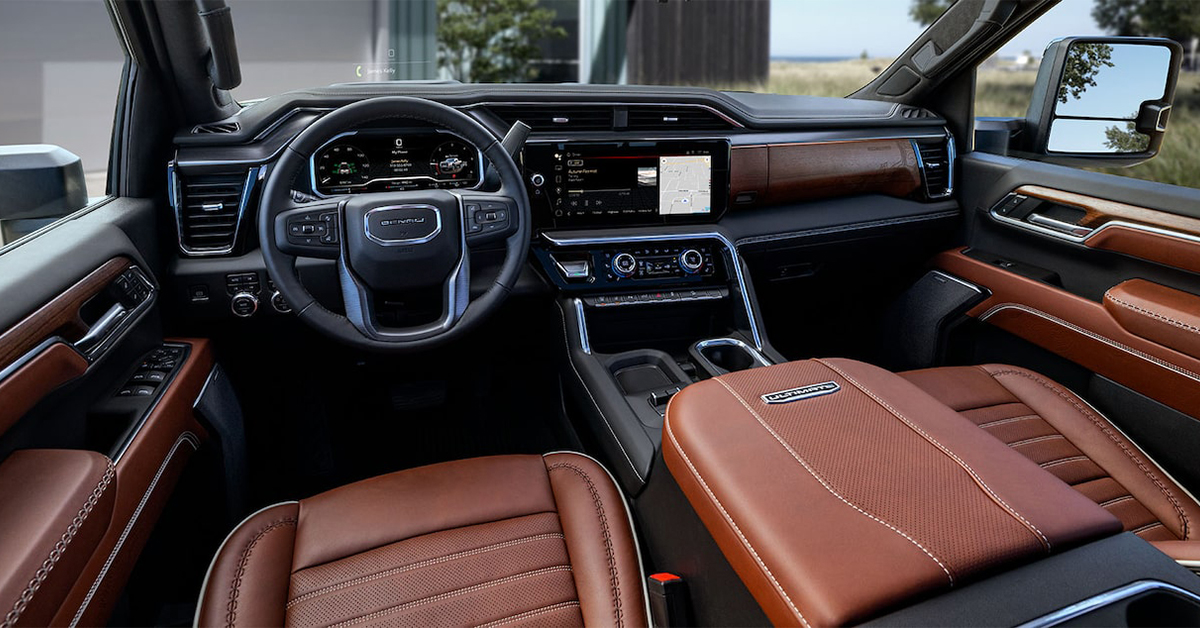
Getting the perfect steering wheel position in your GMC Sierra 1500, Yukon XL, or Sierra HD is key to a comfortable and safe drive. Whether you need to adjust the tilt or telescopic settings, GMC makes it easy with manual and power-adjustable options. In just a few simple steps, you can customize your steering wheel for better visibility, control, and driving comfort.
Not sure how to make the right adjustments? This guide will walk you through the process, ensuring you’re set up for a smooth ride through Waverly, Highland Park, and Alcoma. If you need expert assistance, visit Huston Cadillac GMC, where our team is ready to help you fine-tune your steering wheel and keep your GMC in top shape.
Step-by-Step Guide to Adjusting Your GMC Steering Wheel
Getting the right steering wheel position takes just a few steps. Whether you need to tilt or telescope the wheel, the process is simple. A properly adjusted wheel improves comfort and control, making every drive smoother and safer.
1. Unlock the Steering Wheel
Before making any changes, you need to release the locking mechanism.
- If your GMC has a manual adjustment, find the lever under the wheel or on the side of the steering column.
- If your model has power adjustments, use the switch or knob on the left side of the steering column.
- Pull or press the control to unlock the wheel before adjusting.
2. Adjust the Steering Wheel
Once the wheel is unlocked, move it into the best position for your comfort and visibility.
- Tilt the wheel – Move it up or down to match your height.
- Extend or retract the wheel – Pull it closer or farther for a relaxed reach.
- Test different positions – Find the one that feels best for your arms and shoulders.
3. Lock the Steering Wheel in Place
After adjusting, always secure the wheel before driving.
- If your vehicle has a manual lever, push it back into place until it locks.
- For power-adjustable models, release the switch and ensure the wheel stays in position.
- Give the wheel a slight shake to confirm it is locked.
4. Test Your Driving Position
Make sure your new setup feels right before heading out.
- Your arms should bend slightly when holding the wheel.
- You should see all dashboard gauges without tilting your head.
- Your grip should feel natural, with easy access to controls.
The Sierra 1500, Yukon XL, and Sierra HD offer tilt and telescopic steering adjustments to help you find the perfect fit. Taking a few minutes to adjust your steering wheel ensures a smoother, safer drive.
Finding the Perfect Steering Wheel Position in Your GMC
A well-adjusted steering wheel makes driving safer and more comfortable. It helps you see the road clearly and keeps your arms relaxed. If your wheel is too high or too far away, it can cause strain and reduce control.
Every driver has a different preference. That’s why GMC offers tilt and telescopic adjustments to help you find the right fit. Whether you drive through Waverly, Highland Park, or Alcoma, setting up your steering wheel the right way can improve your driving experience.
Why Proper Steering Wheel Position Matters
The right steering wheel placement gives you:
- A clear view of the dashboard and road
- Better control and response in turns
- Reduced strain on your arms and shoulders
- A safer distance from the airbag in case of impact
How to Know If Your Steering Wheel Needs Adjusting
You might need to tweak your settings if:
- Your arms feel too stretched or too cramped
- The wheel blocks your view of the gauges
- You have trouble reaching the turn signal or wipers
- Long drives leave you with sore arms or shoulders
Finding the Right Fit for Your GMC
GMC models like the Sierra 1500, Yukon XL, and Sierra HD come with manual or power-adjustable steering columns. Depending on your model, you can adjust:
- Tilt – Move the wheel up or down to match your height
- Telescopic – Bring the wheel closer or push it away for better reach
These settings help keep you in the right posture while driving. If you’re unsure where to start, a simple rule is to keep your hands at 9 and 3 o’clock on the wheel. Your elbows should have a slight bend, and your wrists should rest on top of the wheel without stretching.
Taking a few minutes to adjust your steering wheel can make a big difference. It helps you drive with ease and reduces fatigue on long trips. GMC’s adjustable steering column settings let you tailor your ride for better comfort and safety.
Locating the Steering Wheel Adjustment Controls
Before you change your steering wheel position, you need to find the adjustment controls. The location of these controls depends on your GMC model. Some vehicles use a manual lever, while others have power-adjustable options.
Where to Find the Adjustment Controls
In most GMC models, you will find the adjustment controls in one of these places:
- Under the steering column – A small lever you pull or push to unlock the wheel
- On the left side of the steering column – A knob or switch for power adjustments
- On the dashboard near the steering wheel – A button for advanced steering settings
Each of these lets you fine-tune your wheel for the best comfort and control.
Manual vs. Power-Adjustable Controls
Your steering column settings will depend on whether your vehicle has manual or power steering adjustments:
- Manual steering tilt – Pull a lever, move the wheel, then push the lever back to lock it
- Power steering adjustments – Press a button or turn a knob to move the wheel up, down, closer, or farther away
The Sierra 1500, Yukon XL, and Sierra HD may have different options, depending on the trim level. Higher trims often include power-adjustable features for added convenience.
Checking Your Owner’s Manual for Exact Details
Every GMC is a little different. If you’re unsure where to look, your owner’s manual will have the exact location for your steering column settings. It will also explain how to adjust the steering wheel properly for your model.
Taking a moment to locate the adjustment controls makes it easier to find your ideal steering position. A properly set wheel helps you drive more comfortably and with better control.
Manual vs. Power-Adjustable Steering Wheel Controls
GMC vehicles offer two types of steering wheel adjustments: manual and power-adjustable controls. Both let you change the wheel’s position for a better driving experience. The right choice depends on your vehicle and personal preference.
Manual Steering Wheel Adjustments
Most GMC models come with a manual adjustment lever. This allows you to tilt or telescope the wheel by hand.
- How it works:
- Find the lever under the steering column or on the side of the wheel.
- Pull the lever to unlock the wheel.
- Move the wheel up, down, closer, or farther.
- Push the lever back into place to lock it.
- Pros:
- Simple to use and adjust.
- No need for power or extra controls.
- Quick and reliable for all drivers.
- Cons:
- Requires both hands to adjust.
- Can be harder to fine-tune compared to power controls.
Power-Adjustable Steering Wheel Controls
Some higher-trim GMC models offer power-adjustable steering columns. These let you adjust the wheel with the push of a button.
- How it works:
- Locate the adjustment switch on the left side of the steering column.
- Press the switch to move the wheel up, down, closer, or farther.
- Release the switch when you find the best position.
- Pros:
- Allows precise adjustments with ease.
- No manual effort needed.
- Often includes memory settings for different drivers.
- Cons:
- Only available on select models.
- May take longer to adjust compared to a manual lever.
The Sierra 1500, Yukon XL, and Sierra HD may offer both options, depending on trim level. If you prefer quick, hands-on control, a manual steering wheel tilt is a great choice. For added convenience, a power-adjustable steering column lets you adjust your wheel with ease.
How Steering-Column-Mounted Electronic Precision Shift Affects Adjustments
Some GMC vehicles come with Electronic Precision Shift (EPS), a system that replaces a traditional gear shifter. Instead of a gear lever, you use a stalk or buttons to change gears. This feature helps free up space in the cabin and makes shifting smoother.
How EPS Works
EPS is mounted on the steering column, so it changes how you adjust your wheel. Depending on your model, it may use:
- A stalk behind the wheel that moves forward or back to change gears
- Push or pull buttons on the center console for easy shifting
- A joystick-style electronic shifter for added control
How EPS Affects Steering Wheel Adjustments
Because EPS is built into the steering column, it may limit how far you can move the wheel. Before making any adjustments:
- Ensure the shifter is in Park to avoid accidental gear changes
- Move the steering wheel tilt and telescopic settings carefully to avoid blocking the EPS controls
- Test your hand position to make sure you can shift gears without stretching or straining
Best Practices for Comfort and Control
To keep a smooth driving experience with EPS:
- Adjust the wheel so that the stalk or buttons are easy to reach
- Make sure you can shift gears without moving your hands too far
- Avoid placing the wheel too low, which can make it hard to see or reach the controls
Many models, including the Sierra 1500, Yukon XL, and Sierra HD, offer Electronic Precision Shift with different control layouts. Taking time to adjust your steering column settings ensures you can shift gears easily while staying comfortable on the road.
Best Practices for Steering Wheel Adjustments in Different Driving Scenarios
The right steering wheel position helps you stay in control, no matter where you drive. Adjusting your wheel based on the situation can improve comfort and safety. Whether you’re cruising on the highway or tackling rough terrain, small changes can make a big difference.
City Driving
Stop-and-go traffic requires quick reactions and easy access to controls. A proper setup makes turning and braking smoother.
- Keep the wheel tilted slightly upward for a clear view of the road.
- Adjust the wheel closer to your body for better control in tight spaces.
- Make sure your hands rest naturally at 9 and 3 o’clock to reduce strain.
Highway Driving
Long-distance travel means staying comfortable while keeping full control of your vehicle. A well-adjusted wheel reduces fatigue on extended trips.
- Set the steering column so your arms are slightly bent but not too stretched.
- Keep the wheel at a height that allows a full view of gauges and mirrors.
- Avoid placing the wheel too low, which can make it harder to react quickly.
Off-Road and Towing
For rough terrain or hauling heavy loads, your wheel position should help you handle bumps and turns with ease.
- Use a higher tilt for better clearance over uneven ground.
- Keep the wheel slightly farther from your chest to allow free movement.
- Make sure you can grip the wheel firmly while managing rough roads.
Parking and Tight Spaces
Precise steering is key when fitting into small spots or making tight turns.
- Adjust the wheel closer to your body for better leverage.
- Keep the tilt level to avoid straining your wrists.
- Ensure you can turn the wheel without lifting your hands off the grips.
Models like the Sierra 1500, Yukon XL, and Sierra HD come with adjustable steering column settings to fit every driving need. Taking a few seconds to adjust your GMC steering wheel can make all the difference in how smooth and safe your drive feels.
Common Mistakes to Avoid When Adjusting Your GMC Steering Wheel
Setting your steering wheel correctly improves comfort and control. However, small mistakes can lead to discomfort or even safety risks. Avoid these common errors to ensure the best driving experience.
1. Adjusting While Driving
Never change your wheel position while your vehicle is in motion.
- Adjustments can cause sudden loss of control if the wheel moves unexpectedly.
- It’s best to make changes when the vehicle is parked.
- Always test the wheel position before starting your drive.
2. Blocking the Dashboard or Controls
Your wheel should never block important displays or buttons.
- Keep the steering column settings at a height that allows a clear view of gauges.
- Make sure turn signals and other key controls are easy to reach.
- Adjust mirrors after setting the wheel to ensure full visibility.
3. Placing the Wheel Too High or Too Low
A poorly placed wheel can cause discomfort or strain.
- Too high – Arms will stretch too much, leading to fatigue.
- Too low – Legs may hit the wheel, making steering harder.
- Best practice – Your hands should rest at a natural height with a slight bend in your elbows.
4. Sitting Too Close or Too Far
Your wheel should be at a distance that allows full control without overreaching.
- Sitting too close can make quick steering movements harder.
- Sitting too far may reduce grip strength and reaction time.
- Adjust the tilt and reach so your hands stay comfortable at 9 and 3 o’clock.
5. Forgetting to Lock the Steering Wheel
Always secure your wheel before driving.
- If the wheel is not locked, it may move unexpectedly.
- Check the steering column settings to confirm everything is set.
- Give the wheel a quick shake to ensure it stays in place.
Many models, like the Sierra 1500, Yukon XL, and Sierra HD, offer steering wheel tilt and telescopic adjustments. Taking time to adjust your GMC steering wheel the right way will help you drive safely and comfortably.
How do I tilt or telescope the steering wheel in a GMC?
To adjust the steering wheel, locate the adjustment lever under the steering column or on the side of the wheel. Pull or push the lever to unlock the wheel, then move it up or down to tilt or closer or farther to telescope. Once you find the right position, release the lever to lock it in place.
Are steering wheel adjustments powered or manual?
Some GMC models have manual adjustments, while higher trims offer power-adjustable steering wheels. Manual adjustments require pulling a lever to tilt or telescope the wheel, while power adjustments use buttons to move the wheel electronically.
Is there a locking mechanism for the steering wheel once adjusted?
Yes, all GMC steering wheels have a locking mechanism. For manual adjustments, the wheel locks when you release the adjustment lever. For power-adjustable wheels, the position stays in place once set, with some models offering memory settings.
These adjustments help ensure a comfortable and safe driving experience. If you need further assistance, visit Huston Cadillac GMC for expert guidance.
Find Your Perfect GMC at Huston Cadillac GMC Today
Adjusting your steering wheel is a simple step that makes driving more comfortable and safe. Whether you need a better view of the road or a more relaxed grip, taking the time to set your wheel properly can improve every trip.
If you’re in Waverly, Highland Park, or Alcoma, visit Huston Cadillac GMC to explore our selection of trucks and SUVs. From the Sierra 1500 to the Yukon XL and Sierra HD, we have a vehicle to match your needs. Our team is here to help you with everything from steering adjustments to test drives.
Looking for more automotive insights? Learn how GM’s EV pickups compare or explore the latest van showdown between GMC and Ford. If you’re interested in test-driving the latest models, check out our Hummer EV demo event happening soon.
Need expert service? Schedule an appointment with our certified technicians or visit us today.
Get Directions to Huston GMC
Disclaimer: All information is provided for general informational and entertainment purposes only. While we strive for accuracy, we cannot guarantee that all content is complete, current, or error-free. Any reliance you place on such information is strictly at your own risk. This article may include opinions and is not endorsed by, or officially affiliated with, any vehicle manufacturer or brand. Always consult official sources – such as the vehicle’s owner’s manual, authorized dealerships, or certified professionals – for the most up-to-date and personalized information.
Connect with us


- October 2025
- September 2025
- August 2025
- July 2025
- June 2025
- May 2025
- April 2025
- February 2025
- January 2025
- December 2024
- November 2024
- October 2024
- September 2024
- August 2024
- July 2024
- June 2024
- May 2024
- April 2024
- March 2024
- February 2024
- January 2024
- December 2023
- November 2023
- October 2023
- August 2023
- June 2023
- May 2023
- December 2022
- November 2022
- October 2022
- August 2022
- July 2022
- April 2022
- January 2022
- December 2021
- October 2021
- July 2021
- June 2021